
Buying FC Ultimate Team coins on FUTmarket.co.uk is easy, even if it's your first time. Here's everything you need before placing your order.
What you need
With Comfort Trade you share your FC Web App login details and we take care of everything else. Version 3.0 is faster, with the same level of security as always. Have these ready:
- FC Web App e-mail
- FC Web App password
- 3 active backup codes (see below how to get them)
- At least 3,000 coins in your club, for the delivery transfers
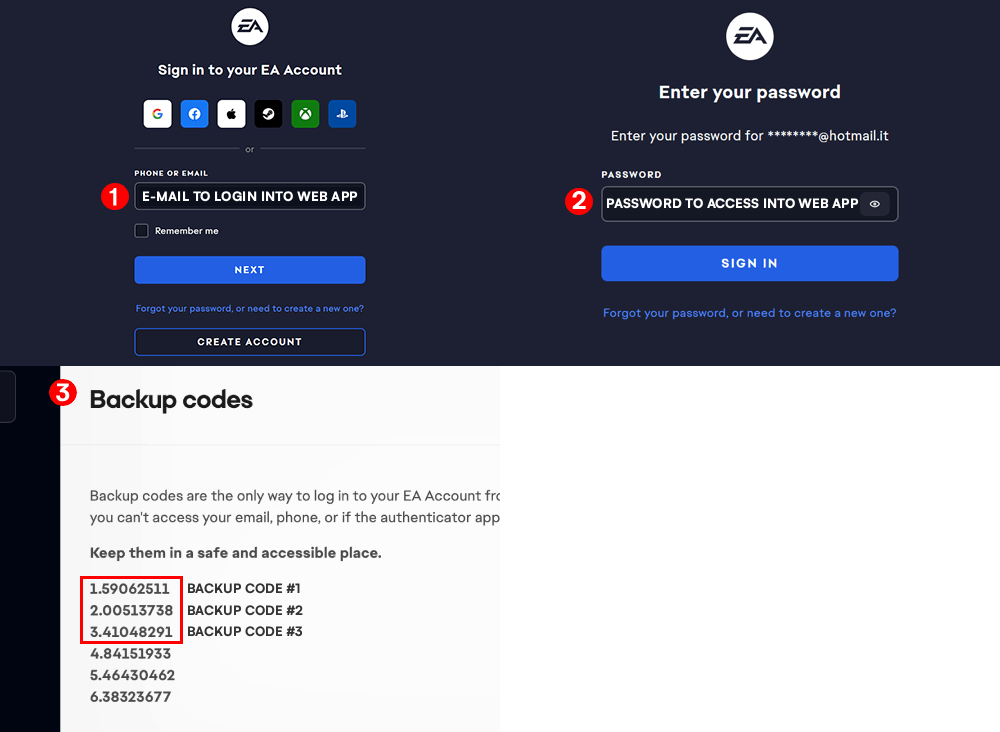
How to get your backup codes
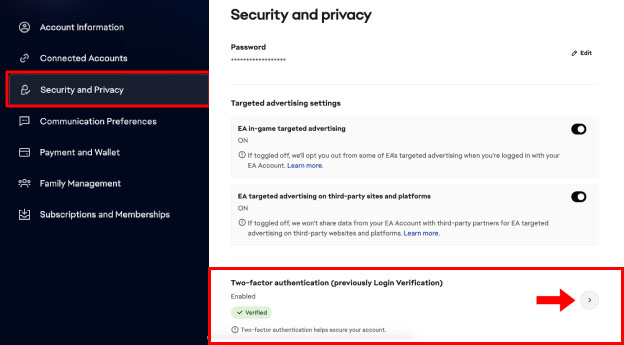
- Open your EA account settings
Go to myaccount.ea.com and log in with your EA e-mail and password. Open the Security tab and click the icon next to Two-factor authentication.
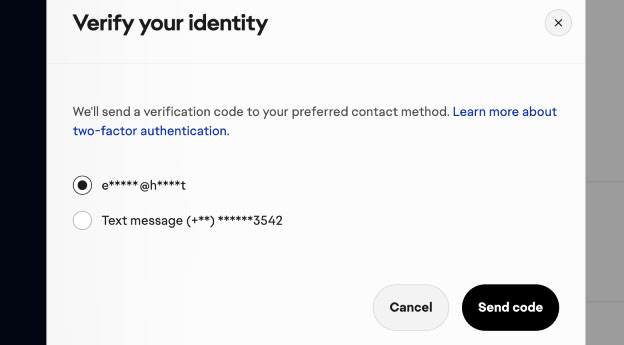
- Confirm the verification code
EA sends you a code by e-mail or text message: enter it to continue.
- View your backup codes
Click View backup codes and the list of codes will appear.

Pick the first 3 active codes (in black). The light-grey ones have already been used and won't work. If they're all used, generate new ones.
- Place your order
With your e-mail, password and 3 backup codes ready, choose your platform and amount on the home page.
Before sending us your details, check they work by logging into the FC Web App.